> ## Documentation Index
> Fetch the complete documentation index at: https://docs.jogg.ai/llms.txt
> Use this file to discover all available pages before exploring further.
# Getting Started
> Quick start guide for JoggAI API
## Welcome to JoggAI API
The JoggAI API unlocks new possibilities, enabling you to effortlessly create dynamic avatar videos and seamlessly integrate JoggAI's advanced AI features into your product.
Sign up and get your API key
View credit pricing
Understand error codes
Manage API usage
***
## Create Account
Sign up to create an account at [https://app.jogg.ai/register](https://app.jogg.ai/register) to access JoggAI's API capabilities.
***
### Get Your API Key
Log in to [JoggAI](https://app.jogg.ai/login)
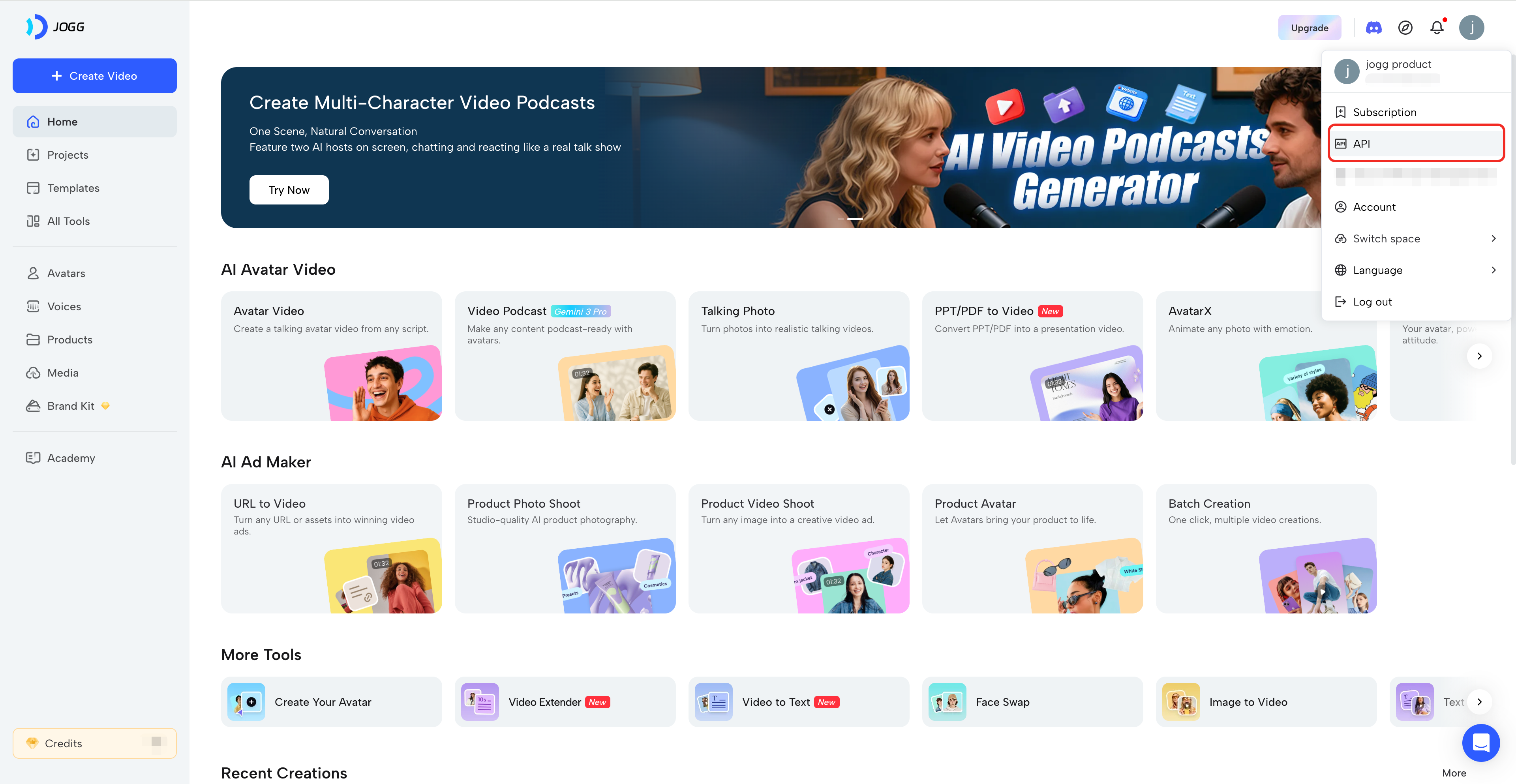
Click your avatar → Select "API" from the menu
 Copy your API key and store it securely
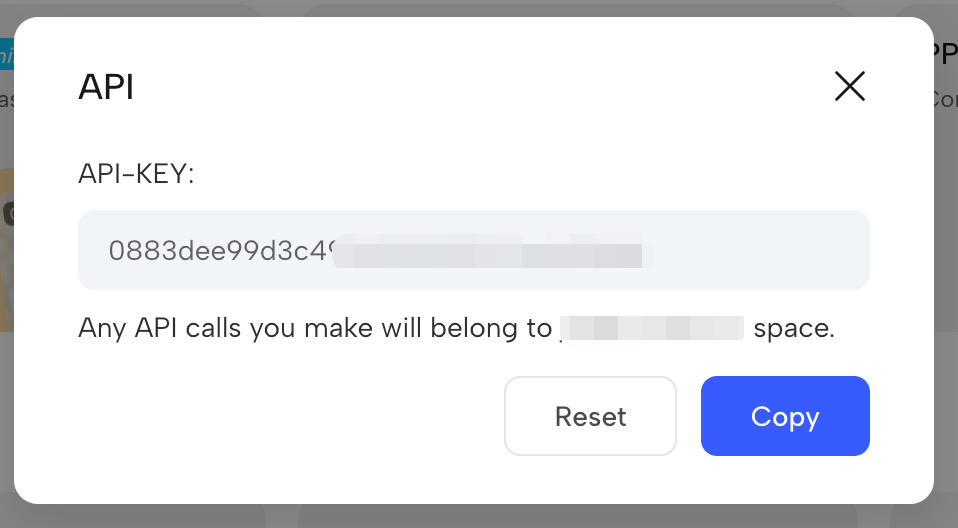 **Keep your API key secure!** Never expose it in client-side code or public repositories.
### Test Your API Key
Include your API key in the request header:
```bash theme={null}
curl -X GET 'https://api.jogg.ai/v2/user/whoami' \
-H 'x-api-key: YOUR_API_KEY'
```
**Expected Response:**
```json theme={null}
{
"code": 0,
"msg": "Success",
"data": {
"email": "user@example.com",
"username": "johndoe"
}
}
```
***
## Quick Start Example
Here's a simple example to create an avatar video:
```bash theme={null}
curl -X POST https://api.jogg.ai/v2/create_video_from_avatar \
-H "x-api-key: your_api_key_here" \
-H "Content-Type: application/json" \
-d '{
"avatar": {
"avatar_type": "0",
"avatar_id": 412
},
"voice": {
"type": "script",
"voice_id": "MFZUKuGQUsGJPQjTS4wC",
"script": "测试一下"
},
"aspect_ratio": "portrait",
"screen_style": 1,
"caption": true,
"webhook_url": "your_webhook_url",
"video_name": "My Talking Avatar Video"
}'
```
See our \[Workflows Guides]\(/api-reference/v2/API Documentation/CreateAvatarVideos) for detailed examples and use cases.
***
## Need Help?
For questions or issues:
* **Email:** [support@jogg.ai](mailto:support@jogg.ai)
* **Dashboard:** [app.jogg.ai](https://app.jogg.ai)
* **Documentation:** Explore our workflow guides for detailed examples
Include your user ID (not API key) when contacting support.
Looking for legacy API documentation? Click [here](/api-reference/v1/QuickStart/GettingStarted).
**Keep your API key secure!** Never expose it in client-side code or public repositories.
### Test Your API Key
Include your API key in the request header:
```bash theme={null}
curl -X GET 'https://api.jogg.ai/v2/user/whoami' \
-H 'x-api-key: YOUR_API_KEY'
```
**Expected Response:**
```json theme={null}
{
"code": 0,
"msg": "Success",
"data": {
"email": "user@example.com",
"username": "johndoe"
}
}
```
***
## Quick Start Example
Here's a simple example to create an avatar video:
```bash theme={null}
curl -X POST https://api.jogg.ai/v2/create_video_from_avatar \
-H "x-api-key: your_api_key_here" \
-H "Content-Type: application/json" \
-d '{
"avatar": {
"avatar_type": "0",
"avatar_id": 412
},
"voice": {
"type": "script",
"voice_id": "MFZUKuGQUsGJPQjTS4wC",
"script": "测试一下"
},
"aspect_ratio": "portrait",
"screen_style": 1,
"caption": true,
"webhook_url": "your_webhook_url",
"video_name": "My Talking Avatar Video"
}'
```
See our \[Workflows Guides]\(/api-reference/v2/API Documentation/CreateAvatarVideos) for detailed examples and use cases.
***
## Need Help?
For questions or issues:
* **Email:** [support@jogg.ai](mailto:support@jogg.ai)
* **Dashboard:** [app.jogg.ai](https://app.jogg.ai)
* **Documentation:** Explore our workflow guides for detailed examples
Include your user ID (not API key) when contacting support.
Looking for legacy API documentation? Click [here](/api-reference/v1/QuickStart/GettingStarted).