> ## Documentation Index
> Fetch the complete documentation index at: https://docs.jogg.ai/llms.txt
> Use this file to discover all available pages before exploring further.
# Getting Started
> Quick start guide for JoggAI API
## Welcome to JoggAI API
The JoggAI API unlocks new possibilities, enabling you to effortlessly create dynamic avatar videos and seamlessly integrate JoggAI's advanced AI features into your product.
***
## Create Account
Sign up to create an account at [https://app.jogg.ai/register](https://app.jogg.ai/register) to access JoggAI's API capabilities.
***
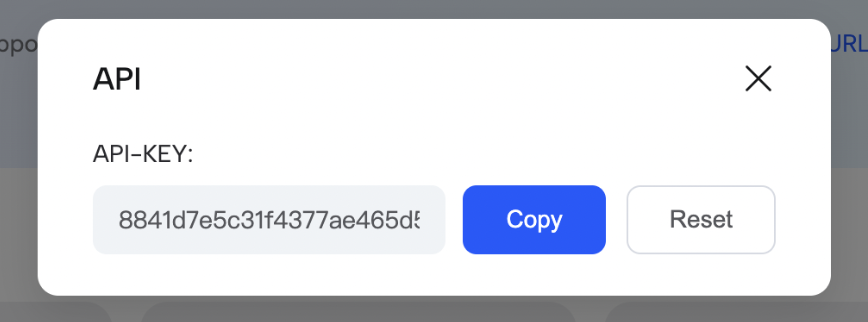
## Get API Key
1. Click your avatar in the dashboard
2. Click 'API'
 3. Copy your API Key
 ***
## API Credit Consumption
**Video Generation:**
* 1 credit per 2 minutes of video
* Less than 2 minutes = 1 credit
**Preview Video:**
* 0.5 credit per 2 minutes
* Less than 2 minutes = 0.5 credit
**AI Scripts:**
* 0.2 credit per API call
**Image Generation:**
* 0.05 credit per image
* 0.2 credit per call (4 images)
**Motion Generation:**
* Motion 1.0: 2 credits
* Motion 2.0: 2 credits
* Motion 2.0 Pro: 3 credits
***
## Best Practices
Always verify the `code` field in responses
Use exponential backoff for retries
Cache frequently accessed data
Avoid polling, use webhooks
***
## Need Help?
For questions or issues:
* **Email:** [support@jogg.ai](mailto:support@jogg.ai)
* **Dashboard:** [app.jogg.ai](https://app.jogg.ai)
* **Documentation:** Explore [Error Handling](/api-reference/v2/QuickStart/ErrorHandling) and [Rate Limits](/api-reference/v2/QuickStart/RateLimits)
Include your user ID (not API key) when contacting support.
***
## API Credit Consumption
**Video Generation:**
* 1 credit per 2 minutes of video
* Less than 2 minutes = 1 credit
**Preview Video:**
* 0.5 credit per 2 minutes
* Less than 2 minutes = 0.5 credit
**AI Scripts:**
* 0.2 credit per API call
**Image Generation:**
* 0.05 credit per image
* 0.2 credit per call (4 images)
**Motion Generation:**
* Motion 1.0: 2 credits
* Motion 2.0: 2 credits
* Motion 2.0 Pro: 3 credits
***
## Best Practices
Always verify the `code` field in responses
Use exponential backoff for retries
Cache frequently accessed data
Avoid polling, use webhooks
***
## Need Help?
For questions or issues:
* **Email:** [support@jogg.ai](mailto:support@jogg.ai)
* **Dashboard:** [app.jogg.ai](https://app.jogg.ai)
* **Documentation:** Explore [Error Handling](/api-reference/v2/QuickStart/ErrorHandling) and [Rate Limits](/api-reference/v2/QuickStart/RateLimits)
Include your user ID (not API key) when contacting support.