> ## Documentation Index
> Fetch the complete documentation index at: https://docs.jogg.ai/llms.txt
> Use this file to discover all available pages before exploring further.
# Create Photo Avatar
> Transform static images into dynamic, talking avatars with JoggAI's Photo Avatar API.
To bring your photo avatars to life, here's a breakdown of the steps involved in uploading, generating, training LORA models, creating new looks, and adding motion for use in JoggAI videos:
## Steps to Use the Photo Avatar API
1. [******Upload Existing Photos or Generate New AI Avatar Photos:******](/api-reference/v1/Avatar/GenerateAIAvatarPhoto) You can upload a set of your own photos or generate new AI photos.
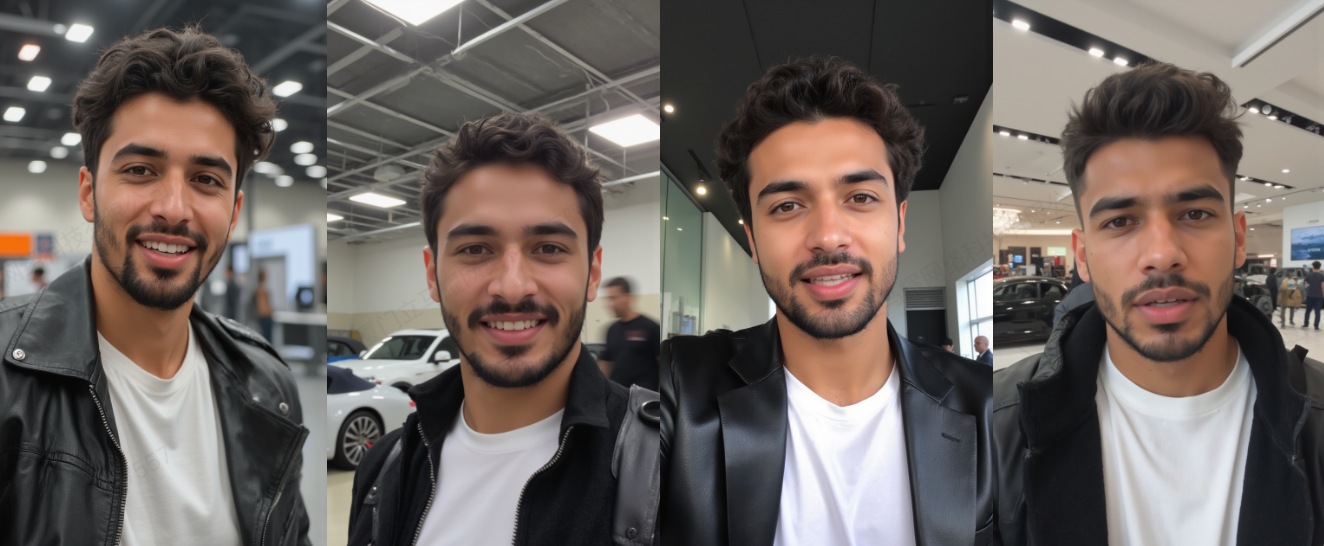
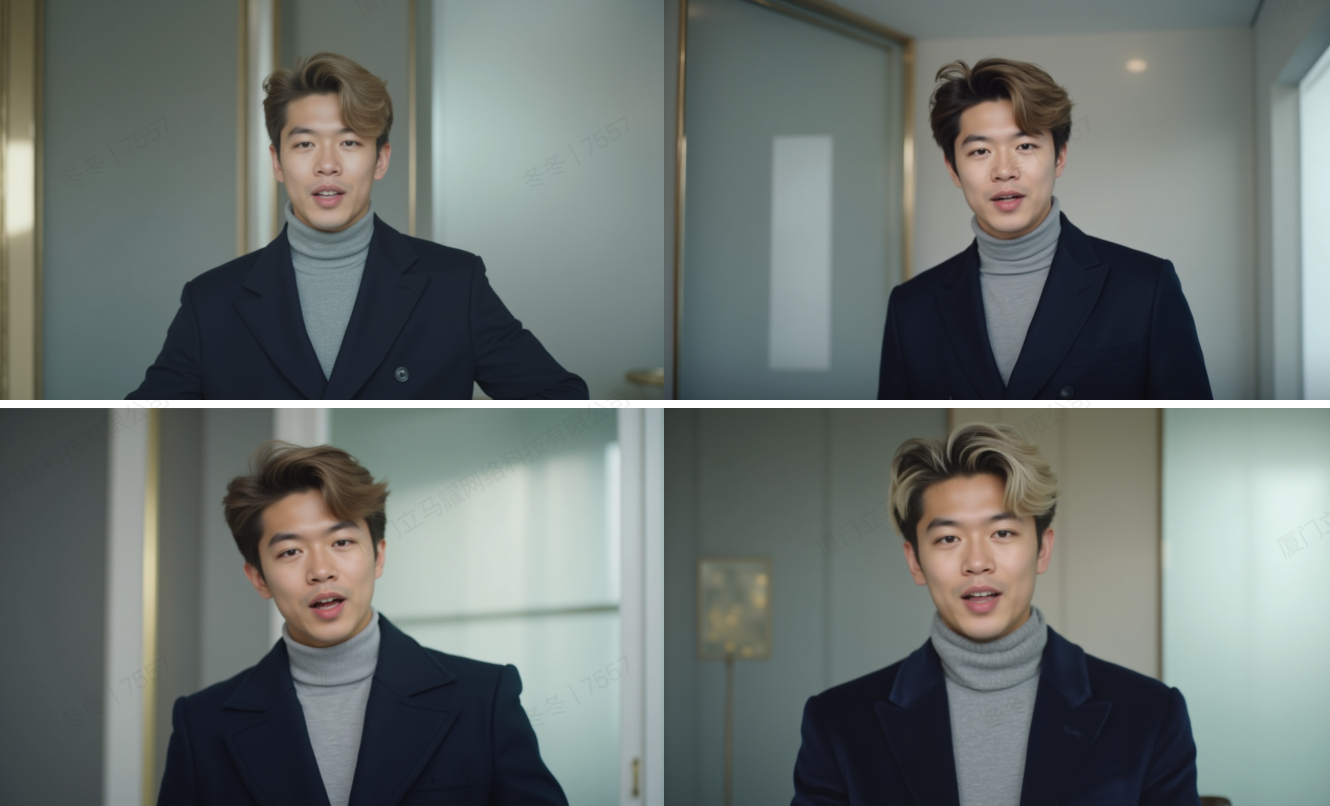
2. [**Create New Looks for the Avatar**](/api-reference/v1/Avatar/GenerateAvatarNewLookPhoto)**:** You can use prompts to generate various "looks" for the avatar, such as different clothing, scenes, or poses. This is done within the trained Avatar Group, giving you diverse outputs.
3. [**Add Motion Programmatically**](/api-reference/v1/Avatar/AddMotion)**:** You can enhance the avatars by adding dynamic motion programmatically. This includes enabling the avatar to move and adding audio to bring the avatar to life.
**a. Image Generation Charges:**
* Each call generates four images.
* Each image deducts 0.05 credit.
* Four images deduct a total of 0.2 credit.
**b. Motion Generation Charges:**
* Motion 1.0 deducts 2 credits.
* Motion 2.0 deducts 2 credits.
* Motion 2.0 Pro deducts 3 credits.
* Motion 3.0 deducts 2 credits.
## **Conclusion**
Once you've created the photo avatar and added motion , you can use these avatars in video generation. This makes it possible to integrate highly personalized, animated avatars into video content creation, enhancing the overall user experience.
# Generate AI Avatar Photos
Learn how to create customized AI avatar photos using JoggAI's API. These avatars can be personalized with attributes such as age, gender, ethnicity, pose, style, and appearance. Once generated, these avatars can be used to create new looks for further customization.
## **Generate AI Avatar Photo**
[See detailed API reference](/api-reference/v1/Avatar/GenerateAIAvatarPhoto)
Use this endpoint to generate AI photo avatars with customizable attributes. The following attributes are required to define the avatar's look: `avatar_styleage`, `gender`, `ethnicity`, `appearance`, `background`, `model`, `aspect_ratio`.
```bash Request theme={null}
curl --location 'https://api.jogg.ai/v1/photo_avatar/photo/generate' \
--header 'accept: application/json' \
--header 'Content-Type: application/json' \
--header 'X-Api-Key: ' \
--data '{
"avatar_style": "social",
"age": "Young Adult",
"gender": "male",
"ethnicity": "Asian",
"appearance": "Medium-length curly bright red hair. Wearing a black satin top with a deep V-neckline, accessorized with gold earrings.",
"background": "A vibrant living room with asymmetrical furniture in bold primary colors, a checkerboard floor, and a sculptural glass coffee table under a geometric pendant light.",
"model": "classic",
"aspect_ratio": 0
}'
```
```bash Response theme={null}
{
"rid": "9ee49c2f31204f76da8081ce0af28eae",
"code": 0,
"msg": "success",
"data": {
"photo_id": "25-1a0ab69d92b6449796d6e9ec0b993a3f"
}
}
```
## **Check Generation Status**
[See detailed API reference](/api-reference/v1/Avatar/CheckPhotoGenerationStatus)
Track the progress of your avatar photo generation using the following endpoint:
```bash Request theme={null}
curl --request GET \
--url https://api.jogg.ai/v1/photo_avatar/generation?photo_id=4ea4fea89c724fcfb49502c4323bac55 \
--header 'accept: application/json' \
--header 'x-api-key: '
```
```bash Response(in Progress) theme={null}
{
"rid": "663a1cbe962c90ed19f395c1f21a3d3c",
"code": 0,
"msg": "success",
"data": {
"photo_id": "25-7fca6bdc66c84767ba8a7ddb9bbb4d77",
"status": "in_progress",
"msg": null,
"image_url_list": null,
"image_key_list": null
}
}
```
```bash Response(Error) theme={null}
{
"rid": "54a8387f7beb857d1f72f2abc421b4ec",
"code": 123,
"msg": "",
"data": {
"photo_id": "def3076d2c8b4929acf269d8ea6b562e",
"status": "error",
"msg": null,
"image_url_list": null,
"image_key_list": null
}
}
```
```bash Response (Success) theme={null}
{
"rid": "54a8387f7beb857d1f72f2abc421b4ec",
"code": 0,
"msg": "success",
"data": {
"photo_id": "25-1a0ab69d92b6449796d6e9ec0b993a3f",
"status": "success",
"msg": null,
"image_url_list": [
"https://res.jogg.ai/joggUserData/aigc/photo/25-1a0ab69d92b6449796d6e9ec0b993a3f/bbb42ee5-8fa1-45b6-be47-105f97d2ca20.png",
"https://res.jogg.ai/joggUserData/aigc/photo/25-1a0ab69d92b6449796d6e9ec0b993a3f/7406e9b3-f1a7-4bae-9bb8-efed69b52bf4.png",
"https://res.jogg.ai/joggUserData/aigc/photo/25-1a0ab69d92b6449796d6e9ec0b993a3f/fd6a5880-9108-48d4-b501-afccec708378.png",
"https://res.jogg.ai/joggUserData/aigc/photo/25-1a0ab69d92b6449796d6e9ec0b993a3f/711bb2f6-ac1c-46bc-94c3-c0ce3a76cef9.png"
],
"image_key_list": [
"joggUserData/aigc/photo/25-1a0ab69d92b6449796d6e9ec0b993a3f/bbb42ee5-8fa1-45b6-be47-105f97d2ca20.png",
"joggUserData/aigc/photo/25-1a0ab69d92b6449796d6e9ec0b993a3f/7406e9b3-f1a7-4bae-9bb8-efed69b52bf4.png",
"joggUserData/aigc/photo/25-1a0ab69d92b6449796d6e9ec0b993a3f/fd6a5880-9108-48d4-b501-afccec708378.png",
"joggUserData/aigc/photo/25-1a0ab69d92b6449796d6e9ec0b993a3f/711bb2f6-ac1c-46bc-94c3-c0ce3a76cef9.png"
]
}
}
```
We have generated our AI Avatar photos, now we can use these `image_key` to create new looks.
##  **Generate Avatar New Look Photo**
[See detailed API reference](/api-reference/v1/Avatar/GenerateAvatarNewLookPhoto)
To generate looks for the photo avatar, you can use the Generate Avatar New Look Photo API. Provide a description in the prompt field, as well as the orientation, pose, and style.
```bash Request theme={null}
curl --request POST \
--url https://api.jogg.ai/v1/photo_avatar/new_look/generate \
--header 'accept: application/json' \
--header 'content-type: application/json' \
--header 'x-api-key: ' \
--data '
{
"photo_id": "https://resource2.JoggAI.ai/image/701c1dfb977d4d62bef3fda755e2d4c5/original.jgp",
"avatar_style": "social",
"age": "Young Adult",
"gender": "male",
"ethnicity": "Asian",
"appearance": "Medium-length curly bright red hair. Wearing a black satin top with a deep V-neckline, accessorized with gold earrings.",
"background": "A vibrant living room with asymmetrical furniture in bold primary colors, a checkerboard floor, and a sculptural glass coffee table under a geometric pendant light.",
"model": "classic",
"appearance": 0
}
```
```bash Response theme={null}
{
"code": 123,
"msg": "",
"data": {
"photo_id": "123"
}
}
```
## **Check status of the look generation**
Using the `photo_id`.
[See detailed API reference](/api-reference/v1/Avatar/CheckPhotoGenerationStatus)
```Request theme={null}
curl --request GET \
--url https://api.jogg.ai/v1/photo_avatar/generation?photo_id=4ea4fea89c724fcfb49502c4323bac55 \
--header 'accept: application/json' \
--header 'x-api-key: '
```
```bash Response(in Progress) theme={null}
{
"code": 123,
"msg": "",
"data": {
"photo_id": "def3076d2c8b4929acf269d8ea6b562e",
"status": "in_progress",
"msg": null,
"image_url_list": null,
"image_key_list": null
}
}
```
```bash Response(Error) theme={null}
{
"code": 123,
"msg": "",
"data": {
"image_url": "def3076d2c8b4929acf269d8ea6b562e",
"status": "error",
"msg": null,
"image_url_list": null,
"image_key_list": null
}
}
```
```bash Response (Success) theme={null}
{
"code": 123,
"msg": "",
"data": {
"id": "def3076d2c8b4929acf269d8ea6b562e",
"status": "success",
"msg": null,
"image_url_list": [
"https://resource2.JoggAI.ai/image/701c1dfb977d4d62bef3fda755e2d4c5/original",
"https://resource2.JoggAI.ai/image/605e0f207d7b4c2c92923dda0d480583/original",
"https://resource2.JoggAI.ai/image/97c92a578a824a2083947285f8b80e4e/original",
"https://resource2.JoggAI.ai/image/2632443cb8394276b8d3046ea6748f47/original"
],
"image_key_list": [
"image/701c1dfb977d4d62bef3fda755e2d4c5/original",
"image/605e0f207d7b4c2c92923dda0d480583/original",
"image/97c92a578a824a2083947285f8b80e4e/original",
"image/2632443cb8394276b8d3046ea6748f47/original"
]
}
}
```
##
**Generate Avatar New Look Photo**
[See detailed API reference](/api-reference/v1/Avatar/GenerateAvatarNewLookPhoto)
To generate looks for the photo avatar, you can use the Generate Avatar New Look Photo API. Provide a description in the prompt field, as well as the orientation, pose, and style.
```bash Request theme={null}
curl --request POST \
--url https://api.jogg.ai/v1/photo_avatar/new_look/generate \
--header 'accept: application/json' \
--header 'content-type: application/json' \
--header 'x-api-key: ' \
--data '
{
"photo_id": "https://resource2.JoggAI.ai/image/701c1dfb977d4d62bef3fda755e2d4c5/original.jgp",
"avatar_style": "social",
"age": "Young Adult",
"gender": "male",
"ethnicity": "Asian",
"appearance": "Medium-length curly bright red hair. Wearing a black satin top with a deep V-neckline, accessorized with gold earrings.",
"background": "A vibrant living room with asymmetrical furniture in bold primary colors, a checkerboard floor, and a sculptural glass coffee table under a geometric pendant light.",
"model": "classic",
"appearance": 0
}
```
```bash Response theme={null}
{
"code": 123,
"msg": "",
"data": {
"photo_id": "123"
}
}
```
## **Check status of the look generation**
Using the `photo_id`.
[See detailed API reference](/api-reference/v1/Avatar/CheckPhotoGenerationStatus)
```Request theme={null}
curl --request GET \
--url https://api.jogg.ai/v1/photo_avatar/generation?photo_id=4ea4fea89c724fcfb49502c4323bac55 \
--header 'accept: application/json' \
--header 'x-api-key: '
```
```bash Response(in Progress) theme={null}
{
"code": 123,
"msg": "",
"data": {
"photo_id": "def3076d2c8b4929acf269d8ea6b562e",
"status": "in_progress",
"msg": null,
"image_url_list": null,
"image_key_list": null
}
}
```
```bash Response(Error) theme={null}
{
"code": 123,
"msg": "",
"data": {
"image_url": "def3076d2c8b4929acf269d8ea6b562e",
"status": "error",
"msg": null,
"image_url_list": null,
"image_key_list": null
}
}
```
```bash Response (Success) theme={null}
{
"code": 123,
"msg": "",
"data": {
"id": "def3076d2c8b4929acf269d8ea6b562e",
"status": "success",
"msg": null,
"image_url_list": [
"https://resource2.JoggAI.ai/image/701c1dfb977d4d62bef3fda755e2d4c5/original",
"https://resource2.JoggAI.ai/image/605e0f207d7b4c2c92923dda0d480583/original",
"https://resource2.JoggAI.ai/image/97c92a578a824a2083947285f8b80e4e/original",
"https://resource2.JoggAI.ai/image/2632443cb8394276b8d3046ea6748f47/original"
],
"image_key_list": [
"image/701c1dfb977d4d62bef3fda755e2d4c5/original",
"image/605e0f207d7b4c2c92923dda0d480583/original",
"image/97c92a578a824a2083947285f8b80e4e/original",
"image/2632443cb8394276b8d3046ea6748f47/original"
]
}
}
```
##  **Conclusion**
In conclusion, By leveraging tools like the Cenerate Avatar photo and Add Looks APIs, users can upload, organize, and enhance avatars with ease.
# **Add Motion to Your Photo Avatar**
Enhance your photo avatar by adding dynamic motion and immersive sound effects! Follow this step-by-step guide to bring your avatar to life.
## **Add Motion**
[See detailed API reference](/api-reference/v1/Avatar/AddMotion)
Add motion to your photo avatar by sending a POST request to the API with the avatar's ID.
```bash Request theme={null}
curl --request POST \
--url https://api.jogg.ai/v1/photo_avatar/add_motion \
--header 'accept: application/json' \
--header 'content-type: application/json' \
--header 'x-api-key: ' \
--data '{
"photo_id": "e08fcc7348ef4f839ed31abf000cef2c",
"image_url": "https://resource2.JoggAI.ai/image/701c1dfb977d4d62bef3fda755e2d4c5/original.jgp",
"name": "name",
"Description": "A vibrant living room with asymmetrical furniture in bold primary colors, a checkerboard floor, and a sculptural glass coffee table under a geometric pendant light.",
"model": "1.0",// 2.0 2.0-Pro
"voice_id": "0"
}'
```
```bash Response theme={null}
{
"rid": "f7c5edfc9eed0db89ef68dadf4604a6b",
"code": 0,
"msg": "success",
"data": {
"motion_id": "25-937af73859a74666b8a4572eb61b4dd5",
"name": "name",
"avatar_id": 155182
}
}
```
## **Check status of the motion generation**
[See detailed API reference](/api-reference/v1/Avatar/CheckStatusOfTheMotionGeneration)
```bash Request theme={null}
curl --request GET \
--url https://api.jogg.ai/v1/photo_avatar?motion_id=e08fcc7348ef4f839ed31abf000cef2c \
--header 'accept: application/json' \
--header 'x-api-key: '
```
```bash Response (Pending) theme={null}
{
"rid": "dfe19f53181dd03e372f19c947fef7f6",
"code": 0,
"msg": "success",
"data": {
"motion_id": "25-937af73859a74666b8a4572eb61b4dd5",
"avatar_id": 155182,
"image_url": "https://res.jogg.ai/joggUserData/aigc/photo/25-7fca6bdc66c84767ba8a7ddb9bbb4d77/e154e565-f21b-4b49-8ca0-c532aacf5c02.png",
"name": "name",
"status": "pending",
"motion_preview_url": "",
"voice_id": "tb_53310bf56ac44e27946ee76409fe9b74"
}
}
```
```bash Response (Error) theme={null}
{
"rid": "dfe19f53181dd03e372f19c947fef7f6",
"code": 123,
"msg": "",
"data": {
"motion_id": "e08fcc7348ef4f839ed31abf000cef2c",
"avatar_id": 12399,
"image_url": "",
"name": "name",
"status": "error",
"motion_preview_url": null,
"voice_id": 123
}
}
```
```bash Response (Completed) theme={null}
{
"error": null,
"data": {
"motion_id": "e08fcc7348ef4f839ed31abf000cef2c",
"avatar_id": 12399,
"image_url": "https://files2.JoggAI.ai/avatar/v3/e08fcc7348ef4f839ed31abf000cef2c/full/2.2/raw_preview_image.webp",
"name": "name",
"status": "completed",
"motion_preview_url": "https://files2.JoggAI.ai/avatar/v3/e08fcc7348ef4f839ed31abf000cef2c/full/2.2/preview_video_target.mp4",
"voice_id": 123
}
}
```
## **Conclusion**
By following the steps outlined in this guide, you can easily add dynamic motion and immersive sound effects to your photo avatars, enhancing the user experience and bringing your avatars to life.
**Conclusion**
In conclusion, By leveraging tools like the Cenerate Avatar photo and Add Looks APIs, users can upload, organize, and enhance avatars with ease.
# **Add Motion to Your Photo Avatar**
Enhance your photo avatar by adding dynamic motion and immersive sound effects! Follow this step-by-step guide to bring your avatar to life.
## **Add Motion**
[See detailed API reference](/api-reference/v1/Avatar/AddMotion)
Add motion to your photo avatar by sending a POST request to the API with the avatar's ID.
```bash Request theme={null}
curl --request POST \
--url https://api.jogg.ai/v1/photo_avatar/add_motion \
--header 'accept: application/json' \
--header 'content-type: application/json' \
--header 'x-api-key: ' \
--data '{
"photo_id": "e08fcc7348ef4f839ed31abf000cef2c",
"image_url": "https://resource2.JoggAI.ai/image/701c1dfb977d4d62bef3fda755e2d4c5/original.jgp",
"name": "name",
"Description": "A vibrant living room with asymmetrical furniture in bold primary colors, a checkerboard floor, and a sculptural glass coffee table under a geometric pendant light.",
"model": "1.0",// 2.0 2.0-Pro
"voice_id": "0"
}'
```
```bash Response theme={null}
{
"rid": "f7c5edfc9eed0db89ef68dadf4604a6b",
"code": 0,
"msg": "success",
"data": {
"motion_id": "25-937af73859a74666b8a4572eb61b4dd5",
"name": "name",
"avatar_id": 155182
}
}
```
## **Check status of the motion generation**
[See detailed API reference](/api-reference/v1/Avatar/CheckStatusOfTheMotionGeneration)
```bash Request theme={null}
curl --request GET \
--url https://api.jogg.ai/v1/photo_avatar?motion_id=e08fcc7348ef4f839ed31abf000cef2c \
--header 'accept: application/json' \
--header 'x-api-key: '
```
```bash Response (Pending) theme={null}
{
"rid": "dfe19f53181dd03e372f19c947fef7f6",
"code": 0,
"msg": "success",
"data": {
"motion_id": "25-937af73859a74666b8a4572eb61b4dd5",
"avatar_id": 155182,
"image_url": "https://res.jogg.ai/joggUserData/aigc/photo/25-7fca6bdc66c84767ba8a7ddb9bbb4d77/e154e565-f21b-4b49-8ca0-c532aacf5c02.png",
"name": "name",
"status": "pending",
"motion_preview_url": "",
"voice_id": "tb_53310bf56ac44e27946ee76409fe9b74"
}
}
```
```bash Response (Error) theme={null}
{
"rid": "dfe19f53181dd03e372f19c947fef7f6",
"code": 123,
"msg": "",
"data": {
"motion_id": "e08fcc7348ef4f839ed31abf000cef2c",
"avatar_id": 12399,
"image_url": "",
"name": "name",
"status": "error",
"motion_preview_url": null,
"voice_id": 123
}
}
```
```bash Response (Completed) theme={null}
{
"error": null,
"data": {
"motion_id": "e08fcc7348ef4f839ed31abf000cef2c",
"avatar_id": 12399,
"image_url": "https://files2.JoggAI.ai/avatar/v3/e08fcc7348ef4f839ed31abf000cef2c/full/2.2/raw_preview_image.webp",
"name": "name",
"status": "completed",
"motion_preview_url": "https://files2.JoggAI.ai/avatar/v3/e08fcc7348ef4f839ed31abf000cef2c/full/2.2/preview_video_target.mp4",
"voice_id": 123
}
}
```
## **Conclusion**
By following the steps outlined in this guide, you can easily add dynamic motion and immersive sound effects to your photo avatars, enhancing the user experience and bringing your avatars to life.